
.png)
Description
Download Hotjar v1 – free heatmap, visitor analytics, conversion tool
Overview: Why Understanding Your Visitors Is Critical
In the digital marketplace, a website can attract thousands of visitors each day, yet without clear insight into how those users behave, the site’s true performance stays hidden. Traditional brick‑and‑mortar stores rely on face‑to‑face interaction to gauge shopper interest; online businesses lack that natural visibility. Hotjar v1 bridges this gap by turning invisible clicks, scrolls, and mouse movements into vivid visual data that anyone—whether a seasoned marketer or a small‑business owner—can interpret.
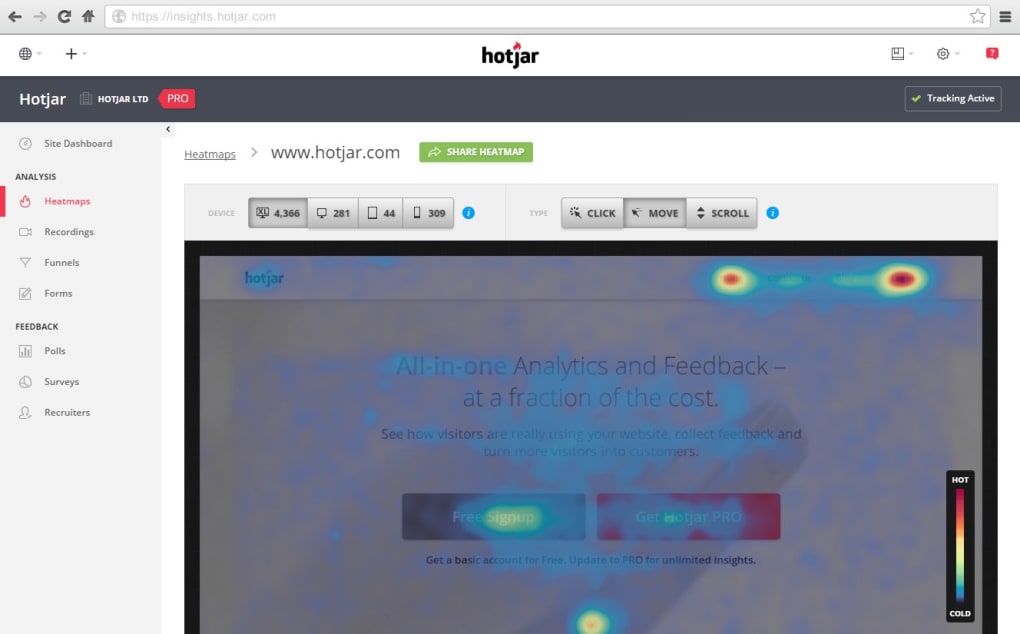
The core philosophy behind Hotjar v1 is simplicity. It automatically scans each page of your site, captures visitor interactions, and converts raw numbers into easy‑to‑read heatmaps, session recordings, and conversion funnels. This visual approach helps you spot “hot” zones where users linger, as well as “cold” spots that cause drop‑offs. Moreover, the built‑in feedback widget lets you ask targeted questions, turning anonymous clicks into actionable comments.
Because the tool focuses on conversion‑rate optimisation (CRO), it’s not just a statistics dump—it’s a decision‑making engine. You can quickly test design tweaks, content changes, or new calls‑to‑action and see their impact in real time. While the free tier provides a solid foundation for small sites, upgrading unlocks advanced filters, unlimited recordings, and deeper integrations with Google Analytics, CRM platforms, and more. In short, Hotjar v1 offers a secure, cloud‑based way to understand your audience without the steep learning curve that usually accompanies traffic analysis.
Key Features of Hotjar v1
- Heatmaps: Colour‑coded visual maps display click density, mouse movement, and scroll depth across desktop, tablet, and mobile devices.
- Session Recordings: Watch real‑time playback of individual visitor journeys to pinpoint friction points in navigation.
- Conversion Funnels: Define key steps (e.g., checkout, sign‑up) and see where users abandon the process.
- Feedback Polls & Surveys: Deploy on‑page questionnaires that capture qualitative insights directly from visitors.
- Form Analysis: Identify which fields cause hesitation or errors, reducing form‑completion drop‑off.
- Incoming Traffic Filters: Segment recordings by source, device, or URL to focus on high‑value audiences.
- Data Export: Export heatmap images and CSV reports for offline analysis or stakeholder presentations.
- Secure Cloud Storage: All data is encrypted in transit and at rest, complying with GDPR and CCPA standards.
- Integrations: Native connections to Google Tag Manager, Slack, and popular CMS platforms for seamless workflow.
Each feature is built with a visual‑first mindset, meaning you don’t need to be a data scientist to extract meaning. The free plan caps recordings at 2,000 sessions per month, which is ample for most startups and personal blogs. If you need unlimited data, the paid tiers start at $39 per month and include advanced segmentation, custom branding, and priority support.
Beyond the listed capabilities, Hotjar v1 continuously rolls out updates based on community feedback. This commitment to improvement ensures that the tool remains relevant as web design trends evolve, whether you’re optimizing a single‑page portfolio or a large e‑commerce platform.
Installation, Setup, and Compatibility
Getting Hotjar v1 up and running is a straightforward process that takes under ten minutes for most users. First, create a free account on the Hotjar website and add a new site profile. You’ll be provided with a unique JavaScript snippet that looks like this:
Copy this snippet and paste it just before the closing tag of every page you want to track. If you use a CMS like WordPress, Joomla, or Shopify, there are dedicated plugins that automate this insertion, reducing the risk of human error.
Supported Platforms: Hotjar v1 is a cloud‑based service that works on any modern web browser, including Chrome, Firefox, Safari, Edge, and Opera. Because the tracking code runs client‑side, the tool is independent of the server’s operating system—whether your site runs on Windows Server, Linux, or macOS, the analytics will be captured flawlessly.
After installing the script, return to the Hotjar dashboard and verify that the site status shows “Connected.” From there, you can configure heatmaps, set up funnels, and launch feedback polls. The interface guides you step‑by‑step: choose a page URL, select the type of heatmap (click, move, or scroll), and define the recording duration. For privacy‑compliant sites, Hotjar offers an opt‑out script that respects the Do Not Track header and can automatically mask sensitive input fields such as passwords and credit‑card numbers.
Updates to the tracking script are handled automatically—Hotjar pushes new versions to the CDN, so you never need to replace the snippet manually. This ensures you always benefit from performance improvements, bug fixes, and new features without any additional effort.
Pros, Cons, and Frequently Asked Questions
Pros
- Free tier provides essential heatmaps and session recordings for small sites.
- Intuitive visual interface eliminates the need for complex data analysis.
- Cross‑device compatibility ensures insights across desktop, tablet, and mobile.
- GDPR‑compliant data handling with easy opt‑out options.
- Seamless integrations with popular marketing and analytics platforms.
Cons
- Advanced features (unlimited recordings, custom branding) require a paid plan.
- Free plan limits data retention to 365 days, which may be insufficient for long‑term trend analysis.
- Some users report a slight page‑load impact due to the tracking script (generally < 200 ms).
Frequently Asked Questions
Is Hotjar v1 truly free, or are there hidden costs?
Hotjar offers a genuinely free tier that includes heatmaps, up to 2,000 session recordings per month, and basic feedback polls. There are no hidden fees; however, if you need unlimited recordings, advanced segmentation, or priority support, you’ll need to upgrade to a paid plan.
Can Hotjar v1 be used on e‑commerce sites that handle sensitive data?
Yes. Hotjar automatically masks input fields marked as password or credit‑card numbers, and you can manually exclude any element via the dashboard. The platform complies with GDPR and CCPA, offering data‑processing agreements for businesses that require them.
How does Hotjar v1 affect website performance?
The tracking script is lightweight (≈ 20 KB) and loads asynchronously, adding less than 200 ms to page load time on average. For most sites this impact is negligible, but you can further optimise by placing the script just before the closing tag.
Do I need technical expertise to interpret the data?
No. Hotjar’s visual dashboards translate raw data into heatmaps and recordings that are easy to understand for non‑technical users. The platform also provides tutorials, webinars, and a knowledge base to help you get started.
Can I integrate Hotjar v1 with Google Analytics?
Absolutely. Hotjar offers a native integration that lets you view heatmap and session data alongside your existing Google Analytics reports, providing a richer picture of user behaviour.
Review Summary: Hotjar v1 delivers a powerful, visual approach to visitor analytics that is both accessible and scalable. The free tier is generous enough for most small businesses, while paid plans unlock enterprise‑grade capabilities. Minor drawbacks like data‑retention limits and a modest performance hit are outweighed by the insight gains.
Conclusion & Call to Action
If you’re looking for a secure, free way to transform vague traffic numbers into concrete, visual insights, Hotjar v1 is an excellent starting point. Its heatmaps, session recordings, and feedback tools empower you to optimise conversion paths without a steep learning curve. Install the script today, explore the free dashboard, and decide whether the premium features align with your growth goals. Ready to see where your visitors really click? Download Hotjar v1 now and start turning invisible traffic into actionable intelligence.
Guides & Tutorials for Hotjar v1
How to install Hotjar v1
- Click the Preview / Download button above.
- Once redirected, accept the terms and click Install.
- Wait for the Hotjar v1 download to finish on your device.
How to use Hotjar v1
This software is primarily used for its core features described above. Open the app after installation to explore its capabilities.
User Reviews for Hotjar v1 0
No reviews found




